 100% On-Device Voice Cloning. Now With 300+ Voices.
 Clone a voice from a five-second clip, or open a library of 300+ ready-made voices. Then write in your language and let it speak in any of 10. Cloning, speech and translation all run on your device, with no cloud and no uploads. Pro generates every language in a single tap.
Download Free iPhone · iPad · Mac · Apple SiliconNo servers. No uploads. No compromises.
Scan a printed page with the camera, or pick a photo, and its text lands in the box, ready to be read aloud. A letter, a page of a book, a printed script: no typing. Recognition runs on your device, and the photo is never stored or uploaded. With Pro, scan several pages into a multi-voice project, one section per page.
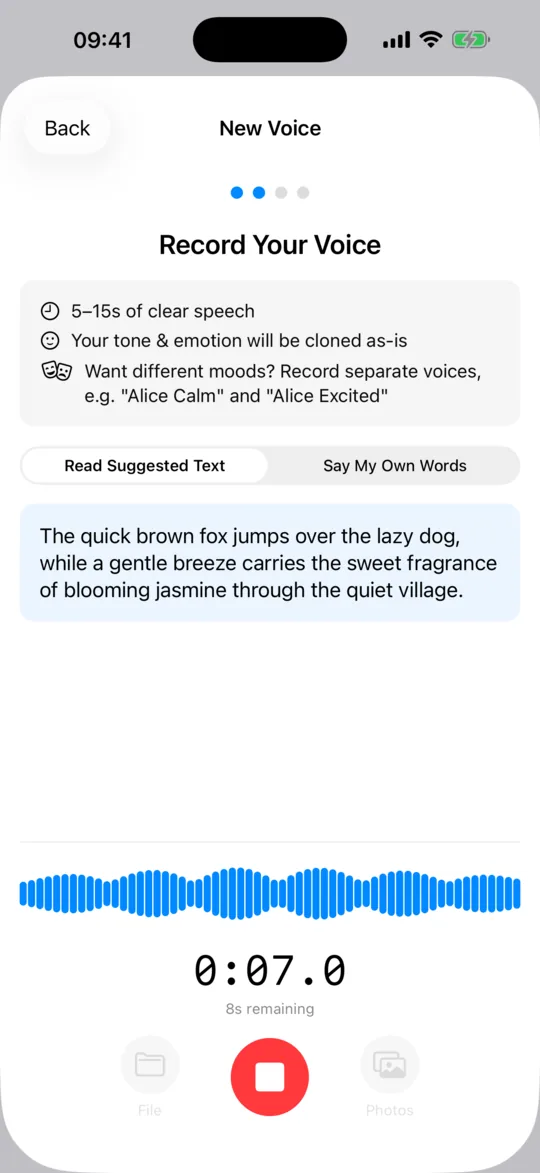
Speak for 5–15 seconds, import an audio file, or drop a video. VoiceNPC extracts the voice, captures its unique fingerprint, and creates a reusable clone instantly on-device.
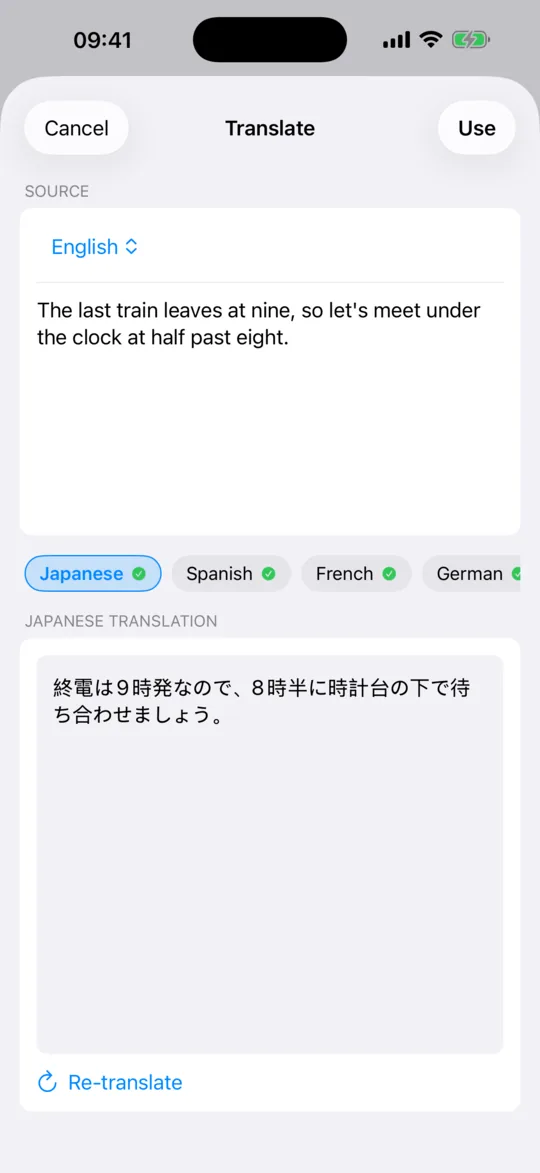
Type in one language and your cloned voice speaks in another. Translation runs fully on-device via Apple's framework. Preview and edit each section before you generate.
Pro users pick multiple target languages at once and get a generation per language from a single input. It's the fastest way to publish a podcast, video, or app demo to a global audience.
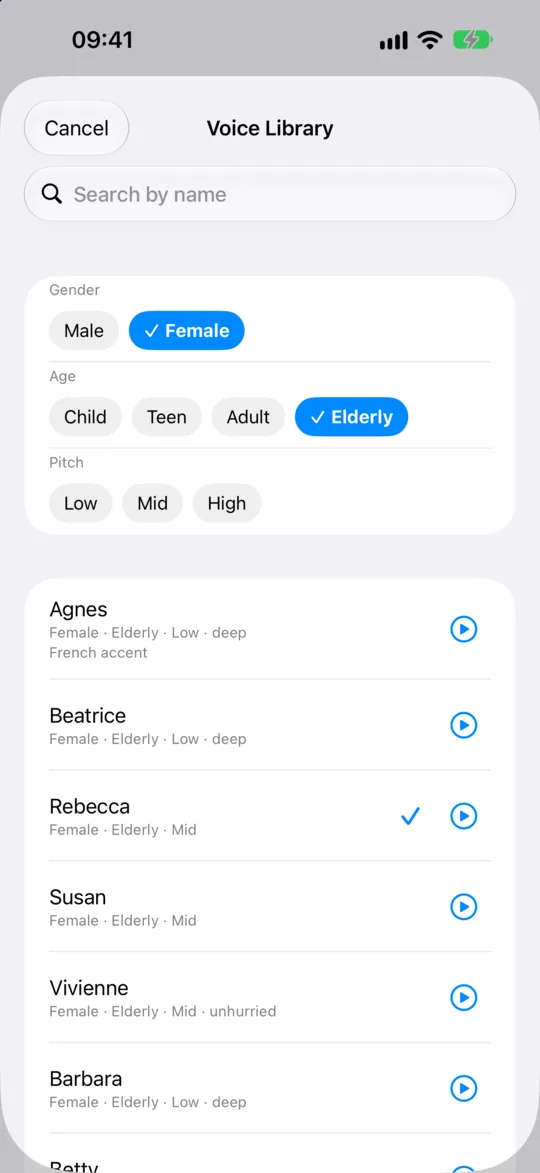
Open the Voice Library from the Generate screen: more than 300 ready-made voices, pre-encoded inside the app. Filter by gender, age and pitch, search by name, and play a demo of any voice before you choose. Browsing and listening are free; generating with a library voice is Pro, and the eight starter voices stay free.
Build podcasts, audiobooks, and dialogues with multiple voices. Assign a different voice and language to each section, then generate the entire project in one go.
Your voice data never leaves your device. No cloud processing, no server uploads, no third-party access. Translation, cloning, and synthesis all run locally.
Your cloned voice, or any library voice, speaks English, Chinese, Japanese, Korean, French, German, Spanish, Russian, Italian, and Portuguese. All naturally, with stable cross-language quality.
State-of-the-art neural TTS running locally via Apple's MLX framework. Tune output with Stable, Natural, or Expressive presets. No internet required. Everything runs on your Apple Silicon chip.
Export audio as WAV, or share voice fingerprints as .voicenpc files. Anyone can generate speech with your voice. Share via Messages, AirDrop, or any app.
From recording to speech in under a minute. Or skip the recording.
Speak naturally for 5–15 seconds, import an audio file, or drop a video, and VoiceNPC captures the unique voice DNA. In a hurry? Start with one of eight built-in starter voices, or open the Voice Library and pick one of 300+ (Pro to generate with).
Type your text in any supported language, or scan a printed page instead. Pick one or more target languages, preview the translation, and pick a style preset. Build multi-section projects with different voices per section (Pro).
Tap generate and your text comes alive in the voice you chose, in every language you picked. Play back with playlist controls, adjust speed, and share the audio anywhere.
The whole run in one clip: record a short sample, type a line, and hear it read back in that voice.
Sound on. The clip is sped up and cut for length. The voice in it comes from the same on-device model the app runs.
Pick a voice for each section of a story from 300+ ready-made ones, then play the scene back with every line in the voice you gave it.
Sound on. The clip is sped up for length. Multi-voice projects and generating with library voices are Pro; browsing the library and playing demos are free.



The iPad build rearranges itself for the bigger screen instead of stretching the phone layout.

VoiceNPC 1.4 adds a Voice Library: more than 300 ready-made voices inside the app, with filters for gender, age and pitch and a demo of each. Pick one and generate in any of the 10 languages, offline. Browsing and listening are free; generating with a library voice is Pro.
Pick a language, then tap a voice. Every clip is the app's own output, the same demo you hear in the picker.
They are all reading Sit here beside me. There's a story I've been waiting to tell you.
Gender, age and pitch filters narrow 300+ voices to the few you want, or search by name. Every voice has a demo, so what you hear in the picker is what you get.
Pick a library voice for your project and generate in any of the 10 languages, the same way you would with a clone. Browsing and listening are free for everyone.
The voices ship pre-encoded inside the app, and they never mix with the voices you record. Choosing one and generating with it never touches the network.
VoiceNPC now translates your script on-device and reads it back in your cloned voice, across 10 supported languages. Pro users generate every target language in a single tap.
Sound on. One script, one cloned voice, four languages back to back.
Tap Preview to read and edit each translated section before audio synthesis. Catch mistranslations before they cost generation time.
Select multiple target languages in one pass. One input becomes a generation per language, built for creators reaching a global audience.
Uses Apple's Translation framework. Runs locally, with no text sent to a server. Your privacy extends to every word you write.
We built VoiceNPC with a simple idea: your voice data (and your script) should never leave your device.
Other voice cloning services charge $22-99/month, limit your usage with credits, and process your voice (and your script) on their servers. We do things differently.
Start free with ads, or go Pro for unlimited generations, every library voice and one-tap multi-language output, for a fraction of what others charge.
Subscriptions auto-renew. Cancel anytime.
Go ProYes. The free tier includes 25 daily energy, eight built-in starter voices, browsing and listening to the whole Voice Library, all languages, unlimited voice clones, and in-app translation (one target language at a time). Need more energy? Watch a short ad, share the app, or invite a friend. No core feature is locked behind a paywall.
A built-in set of more than 300 ready-made voices, new in version 1.4. Open it from the voice control on the Generate screen, filter by gender, age and pitch or search by name, and play a demo of any voice. Browsing and listening are free; choosing a library voice and generating with it is a Pro feature. The voices were generated by the same model the app runs, so no person's voice is behind any of them, and they ship pre-encoded inside the app, so picking one and generating with it works offline.
Yes. Pick any library voice and generate in any of the 10 supported languages, the same way you would with a cloned voice. A few of the voices were built from non-English speech and keep that accent; the picker says so on the row.
Several ways, all free. Your daily energy refreshes automatically, and you can top it up by watching a short ad, sharing the app for a daily reward that grows with your streak, or inviting friends with your personal code. You and each friend who joins both get a bonus. It all lands in one Earned Energy pool that carries over from day to day.
Yes, new in version 1.3. Type your script in any supported language, pick one or more target languages, and your cloned voice will speak the translation. Tap Preview first to read and edit each translated section before generating, so you can catch any mistranslations. Free users translate to one language at a time; Pro users select multiple at once.
Yes. Translation uses Apple's on-device Translation framework, so your script never leaves the device. Most other voice cloning services either don't offer translation or send your text through a cloud API. VoiceNPC keeps both the translation and the voice synthesis fully local.
A Pro feature. Select multiple target languages in a single pass and VoiceNPC generates a separate audio file for each, all in your cloned voice. Perfect for content creators publishing the same script as a podcast, video voiceover, or app demo across many locales without repeating the prompt cycle.
VoiceNPC runs entirely on your device, including in-app translation and a library of 300+ ready-made voices. Your voice and your script never touch a server. Most cloud services charge $22-99/month with strict character or minute limits, and process your data on their servers. VoiceNPC Pro is $4.99/month with truly unlimited usage.
Never. All voice cloning, translation, and text-to-speech processing happens locally on your Apple Silicon chip using the Qwen3-TTS model and Apple's frameworks. Zero network requests are made during voice cloning, translation, or speech generation. Your voice fingerprints are stored only in the app's local sandbox.
A Pro feature. Projects let you create multi-section audio with different voices and languages in each section. Perfect for podcasts with multiple speakers, audiobook chapters with distinct character voices, video dubbing in several languages, or any dialogue-style content. Guided mode gives each section its own voice picker and text box. Script mode keeps everything in one box: write === Alice on a line of its own, and the text under it becomes a new section in Alice's voice.
Unlike services that advertise 'unlimited' but enforce fair-use caps or credit systems, VoiceNPC Pro has no character limits, no minute caps, and no credits that expire. Generate as much speech as you want, as often as you want, in as many languages as you want.
No. Voice cloning, translation, and speech generation work completely offline. You only need internet for the initial app download, model setup, and the one-time language pack downloads for translation, which you add yourself in the Settings app on your iPhone under Apps → Translate → Languages. The Voice Library's demos in a language other than English also download from Apple, once, the first time you play one.
VoiceNPC requires Apple Silicon. It works on iPhone 13 or later, iPad mini (6th gen) or later, iPad Air (5th gen) or later, iPad (11th gen) or later, and any Apple Silicon Mac.
Just record 5–15 seconds of speech, import an audio file, or drop a video. VoiceNPC extracts the voice and creates a reusable clone almost instantly, all processed on your device.
VoiceNPC supports 10+ languages including English, Chinese, Japanese, Korean, French, German, Spanish, Russian, Italian, Portuguese, plus Beijing and Sichuan dialects. Translation between them runs on-device.
Yes! Export any voice as a .voicenpc file and send it via AirDrop, Messages, or any sharing method. The recipient imports the file into VoiceNPC and can generate speech with that voice on their own device. No cloud involved. The voice data transfers directly between devices.
Download VoiceNPC and start cloning voices, picking from 300+ ready-made ones, translating scripts, and publishing in every language. All on your device.
Download on the App StoreRequires iPhone 13 or later, iPad mini (6th gen) or later, iPad Air (5th gen) or later, iPad (11th gen) or later, or any Apple Silicon Mac